Use Cases
Typical automation use cases
- Support data report automation. Example of a typical architecture for a data automation project.
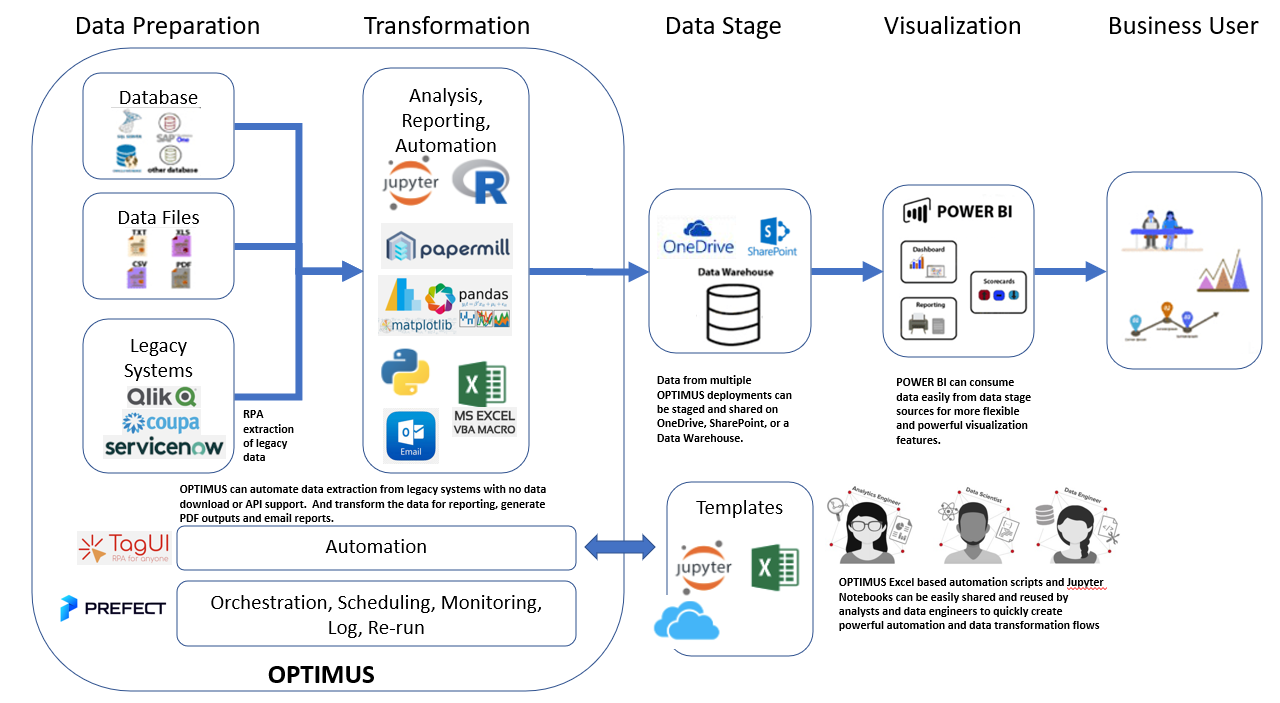
Other example use cases:
- Generate email reports out of a legacy reporting solution. The legacy system did not support email out of the box and also did not support scheduled download of data. Optimus can be used to automate download of data, processing data and formatting the report before sending as an email to users.
- Automate and extend functionality of legacy Excel macro files. These files were originally designed for manual run and had plenty of business logic embedded. The original business developer for the macro has left, and it was risky and would take time to rewrite the entire solution on another platform. As volume increased, the Excel would take many hours to run on the users laptop. Optimus was used to automate the refresh of the Excel macro with minimal modification to the original macro apart from exposing some key parameter fields. Entire automation was deployed to a virtual machine on the cloud. And results from the macro were further transformed for downstream analysis.
- Extract incident and support request data from serviceNow. Optimus was used to combine the different datasets into a harmonized data set for monitoring both incident and request trends. The transformed dataset is passed to PowerBI for interactive visualization by users.
- Automate the monitoring of a website for downtime and failure. Setting thresholds to trigger alert via email or telegram messaging.
- Periodically checking a competitor website for pricing updates, and extracting the data to Excel for further analysis.
Enhancements / Requests
New browser driver option - Playwright for Python - https://playwright.dev/python/docs/intro - https://github.com/microsoft/playwright-python - https://eldadu1985.medium.com/robotframework-browser-automation-tools-a-review-for-2021-29a0835f437d - Robotframework Selenium Library - https://robotframework.org/SeleniumLibrary/SeleniumLibrary.html#library-documentation-top - Robotframework Puppeteer Library - Robotframework Browser Library - https://robotframework-browser.org/#training - https://marketsquare.github.io/robotframework-browser/Browser.html - Robotframework Playwbot
Robotframework - https://robotframework.org/robotframework/latest/RobotFrameworkUserGuide.html#test-setup-and-teardown
Robocorp - https://robocorp.com/docs/libraries/rpa-framework/rpa-desktop
Creating a well-structured documentation for OPTIMUS RPA software is crucial for helping users understand and effectively use the tool. Here's a suggested structure:
- Introduction Overview: Brief introduction to OPTIMUS RPA, its purpose, and key features. Audience: Who the documentation is intended for (e.g., data analysts, developers, business users). Prerequisites: Required knowledge or tools before using OPTIMUS RPA.
- Getting Started Installation: Step-by-step guide to installing OPTIMUS RPA. Quick Start Guide: A simple example to get users up and running quickly. Configuration: Instructions on configuring the software for first-time use.
- User Interface Excel Front End: Detailed explanation of the Excel interface and its components. Navigation: How to navigate through the different sections of the software.
- Creating Automation Flows Basic Concepts: Introduction to automation flows and key concepts. Using Templates: How to use and customize Excel templates for automation.
- Advanced Features Prefect Workflow Engine: Detailed guide on using the Prefect workflow engine. Python Integration: How to integrate and use Python scripts within OPTIMUS. Jupyter Notebooks: Instructions for using Jupyter Notebooks with OPTIMUS. TagUI Integration: Explanation of how to leverage TagUI within OPTIMUS.
- Security and Data Management Security Features: Overview of the security features and best practices. Data Storage: How to manage and store data securely.
- Troubleshooting and FAQs Common Issues: List of common issues and their solutions. FAQs: Frequently asked questions and answers.
- Examples and Use Cases Sample Projects: Detailed examples of automation projects. Industry Use Cases: How different industries can benefit from using OPTIMUS.
- Community and Support Community Forums: Links to community forums and discussion groups. Support: How to get help and support from the OPTIMUS team.
- Appendices Glossary: Definitions of key terms used in the documentation. References: Additional resources and references for further reading.