Installation
Download and run the installer OptimusInstaller.exe.
Enter optimus if you are prompted for password and serial number.
What is included in the installation:
- Python 3.10.9 is packaged with the installer.
- Various libraries required by OPTIMUS.
- Including PREFECT orchestration / workflow, Playwright Browser Automation, Jupyter Notebook.
Installation issues
-
SQLite ‘no such table: json_each’ - potential issue with python / SQLite version. Ensure python version 3.9 or 3.10 is used. Could happen if you tried to install via pip and not from installer.
-
alembic.util.exc.CommandError: Can't locate revision identified by 'a49711513ad4': If you get above error - it means you have a previous version of PREFECT installed that is conflicting with the installation. And to avoid the error, you would need to delete the previous PREFECT databases and reinstall PREFECT. PREFECT database is usually installed in%userprofile%\.prefect. You could remove the entire directory. And then re-install withinstall.bat -o l -
sqlite3.OperationalError: unable to open database file: means that SQLAlchemy (via aiosqlite) is trying to connect to a SQLite database, but it can't find or access the file. Here are some common causes and how to fix them: - Check that the File exist. Ensure the installation of prefect is successful.
- And ensure that you have proper directory permissions to operate prefect, especially the folder
%userprofile%\.prefect. Check your user account control settings in the control panel user accounts.
System Requirements
OPTIMUS has been tested and validated to work under the following environments:
-
Windows. Windows 10 or Windows 10 Enterprise Server and above.
-
Python. Version 3.10.9 (or any version < 3.11 and > 3.9) is the recommended for compatibility with current libraries used by OPTIMUS. And is already packaged with the installer.
-
Cloud drive. OPTIMUS currently does not have a cloud enabled service option. But it is possible deploy OPTIMUS on a cloud virtual machine to run the automation in unattended mode. It is possible to federate an automation task across multiple deployments of OPTIMUS using OneDrive Sync Client or a shared network drive (if running within an enterprise network) to share data, status, and scripts.
See below for an example of such a setup.
Typical cloud deployment architecture
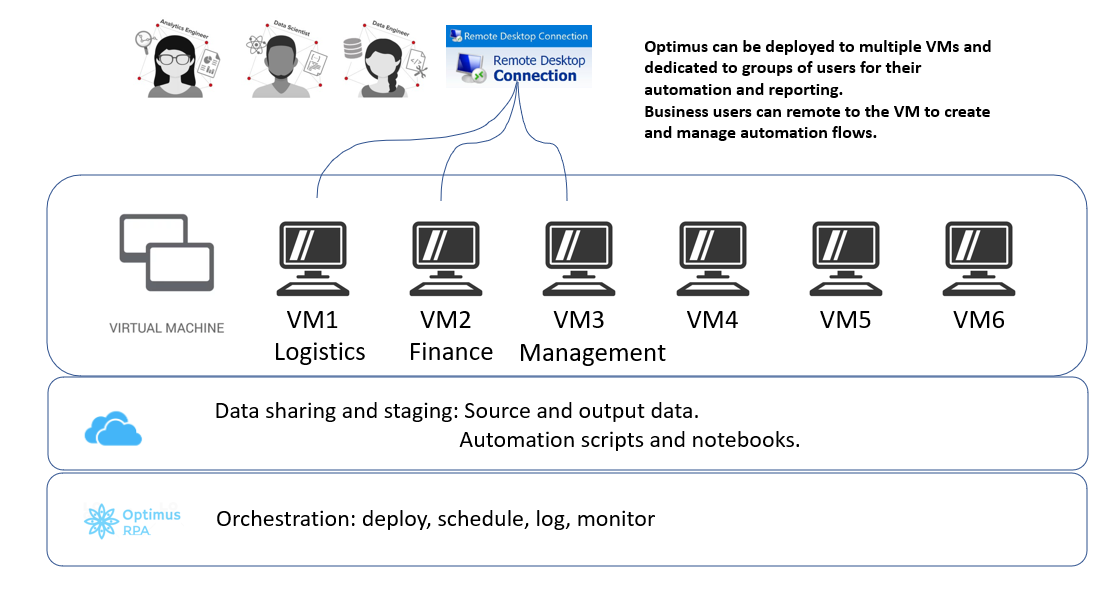
Such an architecture can be further enhanced with remote services via Telegram:
Telegram configuration guide for notification and remote services -
Other program libraries. Will be installed automatically by the installer, including:
- Autobot (RPA component) - designed to work with TagUI and Microsoft Playwright.
- Microsoft Playwright or TagUI - will be installed automatically by the installation program.
- Prefect (workflow orchestration) - full fledged orchestration package for dataflow automation. The on-premise version of Prefect is installed by OPTIMUS. The current release of OPTIMUS does not provide capability out of the box to support federation of robots across the cloud. Future releases may make this easier by leveraging the cloud enabled capabilities of Prefect workflow.